
5 Signs Your Team Needs Workflow Automation Now (2026 Guide)
If your team is buried in repetitive tasks, making frequent errors, or struggling to keep pace with customer demands, it's time to rethink how you work.
Workflow automation—including data entry automation, approval workflows, and sales process automation—can save time, reduce mistakes, and free your team to focus on meaningful work.
These aren't theoretical problems. Over half of knowledge workers lose at least 2 hours daily to tasks that could be automated. That's 500+ hours per employee annually. The question isn't whether you need automation. It's when you'll implement it.
Here are the 5 key signs that indicate your team needs workflow automation now:
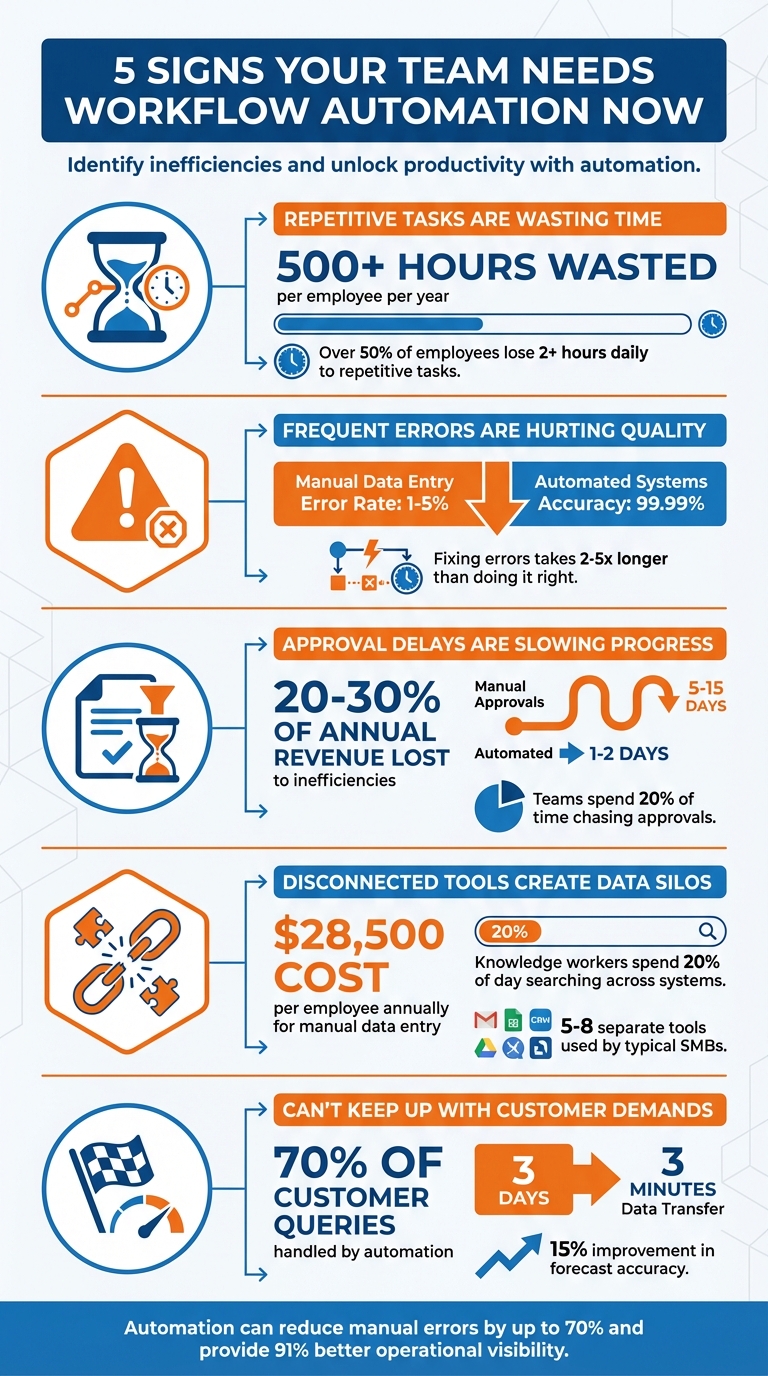
5 Signs Your Team Needs Workflow Automation: Key Statistics and Impact
1. Repetitive Manual Tasks Are Wasting Time
The Problem
Manual data entry, transferring information between spreadsheets, chasing approvals, and scheduling appointments eat up hours that could be spent on strategic work. These tasks don't just waste time—they pull focus away from activities that drive growth.
The numbers: Over half of employees lose at least 2 hours per day to manual, repetitive tasks. That's 182 hours per employee annually. For a 10-person team, that's 1,820 hours yearly—equivalent to one full-time hire at $91,000+ in salary costs alone.
From Chaos to Control
Jennifer Bravo runs three businesses across three continents—insurance, nonprofit, and real estate—with a remote team spread across the U.S., Europe, and Asia. Her days consisted of endless coordination: chasing task status across Asana, managing emails, juggling Google Sheets, and following up on missed details.
"My days consisted of a lot of chasing, gatekeeping, following up. I'd wake up in the middle of the night thinking, oh my god, what did I forget?" — Jennifer Bravo
The problem? Not her team. Not her tools. It was the invisible friction between disconnected systems. Asana, Gmail, Sheets, and her calendar weren't talking to each other. She spent 2+ hours daily spinning her wheels trying to figure out what was handled and what slipped through the cracks.
The solution: A custom AI agent (Maggie) that connected everything—Asana, Gmail, Sheets, Calendar, even WhatsApp. By automating the micro-friction points between her tools, she reclaimed her time and sanity.
The results:
✅ 52% reduction in coordination time
✅ 18-20 hours saved weekly
✅ €2,000+ monthly ROI
✅ 90% fewer daily coordination tasks (2+ hours → 15 minutes)
The Cognitive Cost
After just 2 hours of repetitive tasks, cognitive fatigue sets in and errors become inevitable. Manual data entry has an error rate between 1-4%, while automated systems achieve 99.99% accuracy. Each mistake means rework, delays, and frustrated customers.
If your team spends more time moving data around than using it to make decisions, automation is overdue.
See How Jennifer Bravo Reclaimed 20+ Hours Per Week With Intelligent Automation →
2. Frequent Errors Are Creating Costly Rework
The Cost of Mistakes
Manual data entry errors don't just annoy customers—they drain your bottom line. A 2% error rate translates to 20 errors per 1,000 monthly orders, or 240 errors annually. Each mistake requires 2-5 times longer to fix than getting it right the first time.
Example: A finance team discovering an invoice discrepancy spends 15-25 minutes investigating, correcting, and re-approving it. Multiply that by dozens of weekly errors, and entire workdays are lost to cleanup.
The Quality Impact
Automated systems operate with 99.959-99.99% accuracy compared to human performance at 96-99%. By automating data transfers between your CRM and accounting software, you eliminate "swivel chair integration" (copy-paste between systems), cutting errors by up to 70% and creating a reliable single source of truth.
If your team is constantly fixing data errors, data entry automation and API integration are your fastest ROI.
Curious if automation is right for you?
→ Take Our Free 2-Minute Automation Readiness Assessment
See exactly where you stand and get personalized recommendations on where to start.
3. Approval Delays Are Bottlenecking Your Revenue
The Delay Stacking Problem
Documents needing three signatures often sit idle for 5-15 days as they move through approval chains. A document that should take 1-2 days gets lost in email threads, decision-makers travel, and incomplete forms send requests back to square one.
Teams spend roughly 20% of their time chasing approvals and tracking down information. For a $500K business, approval delays can cost $100K-$150K annually in lost revenue and stalled projects.
How Automation Fixes It
Automated approval workflows route requests instantly based on roles and workloads. Built-in reminders prevent documents from languishing, escalation rules ensure urgent tasks reach backup approvers, and centralized dashboards give full visibility into pending approvals.
Result: Processes that once took 5-15 days complete in 1-2 days.
If approvals are holding up deals or projects, an approval workflow automation system can reclaim that lost revenue immediately.
4. Disconnected Tools Are Creating Data Silos
The "Swivel Chair Integration" Problem
Many SMBs juggle 5-8 separate software tools that don't talk to each other. A salesperson closes a deal in HubSpot but manually re-enters customer details into Xero to generate an invoice. A marketing coordinator exports a contact list from the CRM to upload into Mailchimp.
Your team becomes glorified copy-paste machines instead of doing meaningful work.
The Financial Impact
Manual data entry costs an average of $28,500 per employee annually. For a 10-person team, that's $285,000—before factoring in error costs. Reconciling data across disconnected systems leads to mistakes (1-5% error rate), billing disputes, and unhappy customers.
Knowledge workers spend nearly 20% of their day searching across disconnected systems. Sales data lives in one tool, customer support notes in another, billing records in a third. No department has a complete picture, and leadership scrambles to answer basic questions.
The Solution: API-Based Integration
Automation builds a digital highway connecting your tools. When a deal closes in your CRM, automation instantly creates an invoice in your accounting software with all details pre-filled. When a customer signs up on your website, their information flows automatically into your CRM, email platform, and support ticketing system—no manual intervention required.
Result: 91% of businesses report better operational visibility after implementing workflow automation. Manual errors drop by up to 70%.
Ready to map your integration opportunities?
→ Download Our Free Process Audit Checklist
Identify which workflows are draining the most time and money, and prioritize where to start.
5. Your Team Can't Keep Up with Customer Demands
The Speed Disadvantage
A prospect fills out a contact form, but the follow-up gets delayed because the email sits unnoticed. A customer inquiry goes unanswered because your team is bogged down with data entry. Meanwhile, your competitor—using automated systems—responds within minutes and captures the opportunity.
Slow, manual processes turn skilled employees into "human routers," forwarding emails and re-entering data instead of delivering value.
Real-World Impact
In February 2026, a Manchester-based e-commerce company implemented customer service automation to handle first-response queries. The system now handles 70% of inquiries, saving £50,000 annually in staffing costs and providing 24/7 service.
Similarly, a manufacturing client reduced sales data transfer time from 3 days to 3 minutes using automated workflows. This improved forecast accuracy by 15% and sped up month-end processes.
Decision-Making Delays
Manual processes force decisions based on outdated information. A deal closes while finance is still updating records, leaving leadership to act on week-old data instead of real-time insights.
Automation provides live dashboards and instant updates, empowering your team to respond faster and make informed decisions without adding headcount.
See How Echo Analytics Transformed Their Operations With Custom Automation →
How Agents Dynamic Solves These Problems
If these signs resonate, you're not alone—and you don't have to solve this alone either.
Agents Dynamic specializes in designing workflow automation systems tailored to how your team actually works. Rather than imposing rigid software, we focus on understanding your workflows and building systems that reduce friction and drive results.
For Repetitive Tasks & Data Entry
We use Intelligent Document Processing (IDP) powered by AI to extract data from invoices, contracts, and forms in seconds with 95% accuracy—eliminating manual data entry entirely. Our custom AI agents built on n8n autonomously handle customer support, lead qualification, and data analysis, freeing your team to focus on high-value work.
For Data Silos & Integration
We employ API-based integration using n8n and Supabase vector databases to ensure seamless information flow between your CRM, billing systems, and project management tools. This automated synchronization eliminates manual data transfers, creates a single source of truth, and delivers real-time insights.
Result: Up to 70% reduction in manual errors and complete visibility across your operations.
For Approval Delays
We design automated routing workflows that send requests directly to the right manager based on roles and workloads. Escalations for urgent tasks are automated, centralized dashboards give full visibility, and automated reminders keep the process on track.
For Customer Demands
Our systems sync data instantly and trigger follow-ups—whether email, task assignment, or sales alert—as soon as a prospect fills out a form. No lead gets overlooked. Your team responds faster and more effectively.
FAQs
Which workflow should we automate first?
Start with the workflow that eats up the most time and causes the most errors. Common candidates:
Data entry automation – Tedious, error-prone, and often requires juggling multiple systems
Approval workflow automation – Visible delays that slow down revenue-generating activities
Sales process automation & lead routing – Direct impact on sales velocity and customer satisfaction
Automating any of these can save your team hours weekly, minimize errors, and deliver measurable ROI within 30-90 days.
How do we calculate ROI for workflow automation?
Simple formula:
(Annual Hours Saved × Hourly Cost) + (Errors Prevented × Error Cost) - (Implementation + Maintenance Costs) = Net Annual Benefit
Example: Automating invoice processing
Current: 3 hours × 50 invoices/month × $40/hour = $6,000/month = $72,000/year
Implementation cost: $5,000
Year 1 ROI: ($72,000 - $5,000) / $5,000 = 1,400% ROI
Most workflow automation pays for itself within 8-18 months.
Use our free ROI Calculator to estimate your specific savings. Most workflow automation pays for itself within 8-18 months.
Will automation replace our team or change roles?
Automation complements team roles—it doesn't eliminate them. By handling repetitive tasks like data entry or sending notifications, it frees team members to focus on strategic and creative work.
Roles may shift toward overseeing automation, designing workflows, and managing systems. This enables teams to boost innovation and productivity without cutting staff.
The Bottom Line
If your team is drowning in repetitive tasks, dealing with constant errors, waiting days for approvals, or struggling to keep pace with customer demands, you're not alone. These aren't just frustrations—they're clear signals that it's time for change.
The question isn't whether you'll eventually automate. Market pressure will force that change regardless. The question is whether you'll lead that transformation in your market or follow after competitors have already captured the advantage.
Start small. Use our Process Audit Checklist to identify quick wins. Focus on one high-impact workflow, measure the results, and watch how quickly ROI adds up.
Whether you tackle this yourself or partner with Agents Dynamic, taking action today sets you up to stay ahead.
Ready to Reclaim Lost Hours and Accelerate Growth?
Book Your Free 30-Minute Consultation →
We'll assess your top automation opportunities and show you exactly how much time and money you could save.