
Business Process Automation: Complete Guide
Business Process Automation: Complete Guide
In today’s fast-paced world, business process automation (BPA) is no longer a luxury - it’s a necessity. Companies lose 20-30% of their budgets to manual, repetitive tasks, while errors cost U.S. businesses an estimated $3 trillion annually. By automating workflows, organizations can achieve 40-80% efficiency gains, cut execution times by 75%, and reduce costs by up to 90%.
Here’s what you need to know about BPA:
What it is: BPA uses technology to automate repetitive, rule-based tasks across systems, improving accuracy and saving time.
Why it matters: Automation reduces errors, speeds up processes, and frees employees to focus on higher-value work.
Key benefits: Companies adopting BPA report lower operational costs, faster workflows, and better compliance.
How to start: Focus on repetitive tasks like data entry or approvals. Use tools like SaaS platforms, low-code solutions, or custom-built systems based on your needs.
Next step: Take our free 2-minute Automation Readiness Assessment to identify your best opportunities.
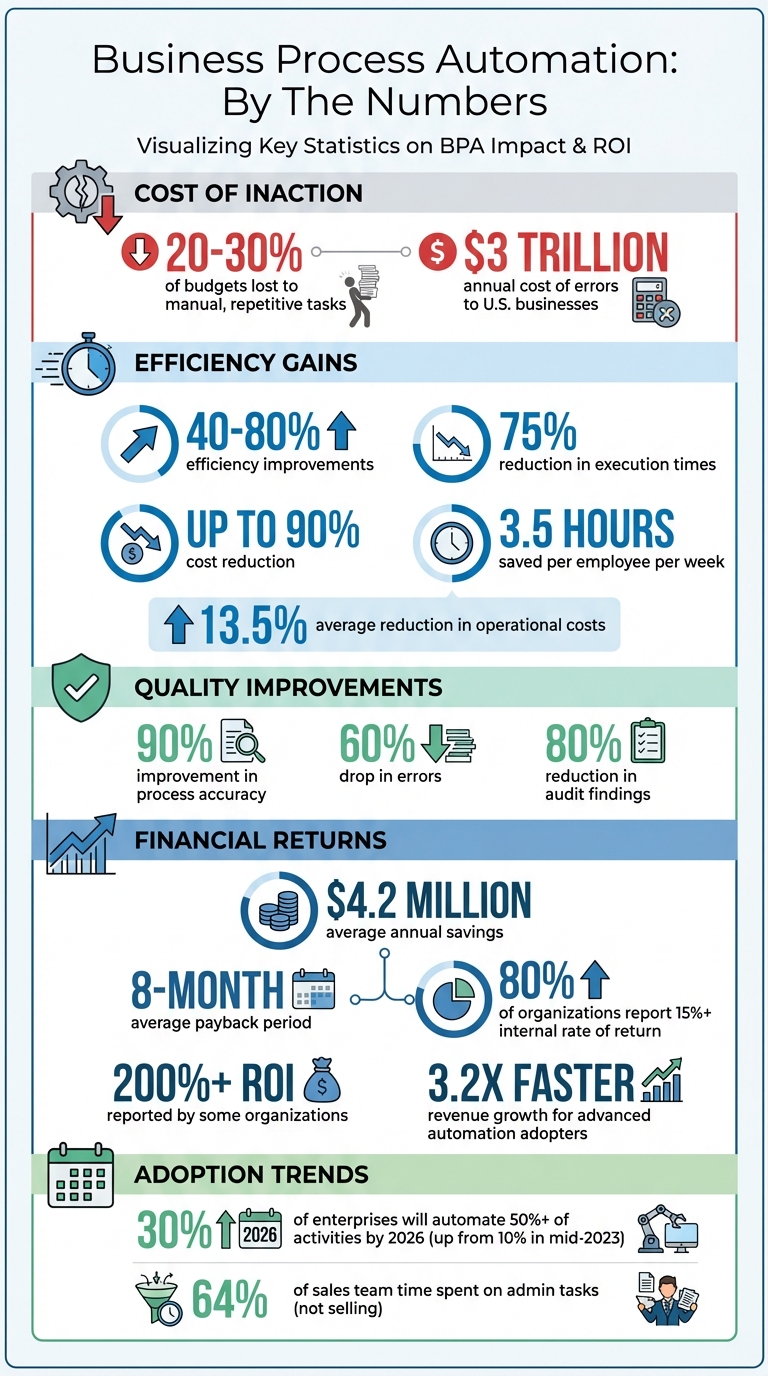
Business Process Automation ROI and Impact Statistics
What is Business Process Automation?
Business Process Automation (BPA) uses technology to handle repetitive, multi-step tasks and manage workflows across an organization. Instead of manually transferring data, routing approvals through endless email chains, or juggling spreadsheets, BPA takes over, streamlining processes for better efficiency, accuracy, and consistency.
Real example: When a prospect fills out a website form, BPA automatically:
Captures their details in your CRM
Categorizes the lead based on company size or industry
Sends a tailored follow-up email
Schedules a meeting on your team's calendar
All in seconds, with zero manual effort or errors
How BPA Works: 5 Key Steps
Trigger – A form submission, scheduled event, or incoming data kicks off the process
Connection – Systems share data through APIs (your CRM talks to your email platform)
Processing – The automation reformats, validates, or enriches the data
Execution – The task happens (database update, email sent, file moved)
Monitoring – Real-time dashboards track performance and flag bottlenecks
Definition and How it Works
At its core, BPA focuses on tasks that are:
Repetitive – Same steps happen over and over
Rule-based – Clear logic (if X happens, do Y)
Predictable – Consistent inputs and outputs
The magic lies in system integration—connecting your existing tools so they "talk" to each other automatically. When one system receives new data, it triggers actions in others without manual steps like copying and pasting.
Results:
40-80% efficiency gains
$4.2M average annual savings
8-18 month payback period
BPA vs. RPA vs. Workflow Automation
These terms get confused. Here's the difference:
Aspect | Workflow Automation | Robotic Process Automation (RPA) | Business Process Automation (BPA) |
|---|---|---|---|
Scope | Specific tasks in sequence | Individual repetitive tasks | End-to-end complex processes |
Example | Route an approval email | Click buttons in legacy software | Integrate 5 systems + AI decisions |
Best for | Simple multi-step workflows | Data entry in old systems | Complex cross-department processes |
Think of it this way:
Workflow automation = Conveyor belt moving items between stations
RPA = Robotic arm doing one repetitive task
BPA = Entire smart factory coordinating everything
Common Misconceptions About Automation
Myth #1: "Automation replaces jobs"
Reality: Sales teams spend 64% of time on admin tasks. Automation frees them to sell more.
Benefit: Happier employees, 40% less turnover when people focus on meaningful work
Myth #2: "It's only for large corporations"
Reality: Cloud tools and low-code platforms let small teams automate without IT departments
Cost: Starting as low as $100-500/month depending on complexity
Myth #3: "It's too expensive"
Reality: Companies save $4.2M annually with 8-month payback periods
80% of organizations report 15%+ ROI; many see 200%+ returns
Why Business Process Automation Matters
Knowing what Business Process Automation (BPA) is only scratches the surface. The real value lies in how it transforms operations, directly affecting your bottom line and giving you a leg up in the market.
Productivity Gains and Time Savings
Employees reclaim 3.5 hours per week through automated workflows. That's:
182 hours/year per employee
For a 10-person team: 1,820 hours annually (equivalent to one full-time hire)
At $50/hour cost: $91,000+ freed up annually just for a small team
Where this time goes:
Sales teams → Spend time selling (not updating CRM)
HR teams → Focus on hiring strategy (not data entry)
Finance teams → Analyze trends (not processing invoices)
Customer service → Solve complex issues (not routing tickets)
Industry trend: By 2026, 30% of enterprises will automate over 50% of their workflows (vs. 10% in mid-2023). Companies acting now get a competitive advantage.
Cost Savings and ROI: The Numbers That Matter
Metric | Result |
|---|---|
Operational cost reduction | 13.5-90% (depending on process) |
Error reduction | 90% fewer mistakes |
Payback period | 8-18 months |
Average annual savings | $4.2M |
Internal Rate of Return | 15-200% |
Revenue growth acceleration | 3.2x faster growth vs. non-automating competitors |
What costs money:
Mistakes in data handling: $3 trillion/year lost across U.S. businesses
Manual invoice processing: 90%+ error reduction possible
Delayed approvals: Slows cash flow and decision-making
Example: One accounting team automating invoice processing:
Before: 3 hours per invoice (manual data entry, matching, approvals)
After: 5 minutes per invoice (system handles 95%)
Savings: ~2.5 hours × $40/hour × 500 invoices/year = $50,000+ annually
Quality & Consistency: Fewer Errors, Better Outcomes
Automated processes deliver:
90% improvement in accuracy (machines don't have "bad days")
60% drop in errors across all process types
80% reduction in audit findings in regulated industries (GDPR, HIPAA, SOX-compliant operations)
Audit trails documenting every step for compliance and troubleshooting
Human benefit: Taking repetitive tasks off your team's plate:
↑ Job satisfaction improves
↓ Staff turnover decreases
↑ Employees can do meaningful, creative work
↑ Compliance is easier to maintain
Business Process Automation Solutions: Tools and Approaches
Three main categories exist:
1. SaaS Tools (Off-the-Shelf)
What: Pre-built products designed for general use (CRM, email marketing, scheduling)
Pros:
Low cost (subscription-based)
Fast setup (hours to days)
No coding needed
Cons:
Limited customization
Vendor lock-in risk (they raise prices, features disappear)
May not fit unique workflows
Best for: Simple, straightforward tasks (lead capture, appointment scheduling)
2. Low-Code Platforms (like n8n, Zapier, Make)
What: Drag-and-drop builders with optional custom code (JavaScript, API calls)
Pros:
Balance of simplicity and flexibility
Faster than building from scratch
Allows customization without hiring developers
Moderate cost
Cons:
Steeper learning curve than SaaS
Still limited compared to fully custom
Best for: Custom workflows without needing a full development team
3. Custom AI-Powered Solutions
What: Built specifically for your business (leverages AI for intelligent decision-making, not just rules)
Pros:
Total control over design, security, integrations
AI-driven decisions (not just rule-based logic)
Competitive advantage through proprietary workflows
Scalable to enterprise complexity
Handles legacy systems that lack APIs
Cons:
Higher upfront cost
Longer timeline (6-12 weeks)
Requires ongoing maintenance
Best for: Complex workflows, competitive advantage, regulated industries, legacy system integration
Feature | SaaS | Low-Code | Custom AI |
|---|---|---|---|
Cost | Low (subscription) | Moderate | Higher initial |
Setup time | Hours-Days | Days-Weeks | 6-12 Weeks |
Customization | Limited | High | Unlimited |
Scalability | Moderate | High | Unlimited |
AI capabilities | None | Limited | Advanced |
Best for | Simple tasks | Custom workflows | Complex/proprietary/regulated |
Which Solution is Right for Your Business?
Choose SaaS if:
Task is simple and straightforward
Vendor's pre-built solution handles 90% of your need
Budget is tight and speed matters
Choose Low-Code if:
Workflow needs customization but isn't proprietary
You have 1-2 people who can learn the platform
Timeline is 2-8 weeks
Choose Custom AI if:
Workflow is a competitive differentiator
You work in a regulated industry (compliance critical)
You need AI-driven decisions, not just rules
You're integrating legacy systems
You want hands-off, managed solutions
How to Implement Business Process Automation (Step-by-step)
Step 1: Identify Which Processes to Automate
Good candidates for automation:
✅ Manual data entry across systems
✅ Order processing and fulfillment
✅ Invoice generation and payment reminders
✅ Report creation and distribution
✅ Appointment scheduling and confirmations
✅ Lead routing and qualification
✅ Expense approval workflows
NOT good candidates:
❌ Tasks requiring human judgment/empathy
❌ Creative work
❌ Strategic decisions
❌ Complex customer interactions
Ask yourself:
Is this task repetitive? (Daily, weekly, recurring?)
Does it involve transferring data between systems?
Does it follow predictable rules?
Is it taking time away from revenue-generating work?
If you answered yes to 3+ questions → Strong automation candidate
Download our Process Audit Checklist to systematically identify your best opportunities and quantify potential savings.
Step 2: Audit Your Current Processes
Before automating, map out exactly what happens now:
Document:
Every step in the workflow
How long each step takes
Who's involved
Where bottlenecks exist
Error rates and costs
Ask your team:
"What part of this process drives you crazy?"
"Where do we lose information?"
"How long does this really take?"
Key metrics to capture:
Hours spent per week on this task
Error rate (how often does something go wrong?)
Cost per error
Systems/tools involved
These metrics let you calculate ROI later and prioritize which processes to automate first.
Pro tip: If a process is broken before you automate it, automation just makes the problem worse and faster. Fix it first, then automate.
Step 3: Design Your Automation
Set measurable goals:
❌ "Speed up invoicing" (vague)
✅ "Reduce invoicing time by 50% (from 3 hours to 1.5 hours per invoice batch)" (specific, measurable)
Map the ideal workflow:
Where do decisions need to happen?
How do you handle exceptions?
What's the 80% case vs. the edge cases?
(Automate the 80%, handle exceptions manually until patterns emerge)
Plan for growth:
Will this automation work if you 2x your volume?
What if you add new offerings or markets?
Building scalability now saves months later
Step 4: Implement & Test
Start small with a pilot:
Pick ONE manageable process
30-90 day timeline
Test with real data under realistic scenarios
Fix issues before rolling out to production
Why pilots work:
Build momentum with early wins
Demonstrate ROI to stakeholders
Test edge cases in controlled environment
Train your team on the process
Step 5: Monitor, Optimize & Scale
Track these metrics:
Cycle time reduction (target: 50-80% faster)
Error reduction (target: 90% fewer mistakes)
Cost savings (actual $ saved vs. projected)
User adoption (are people actually using it?)
Review schedule:
New automations: Monthly check-ins first 3 months
Stable automations: Quarterly reviews
Gather feedback from actual users (they notice issues first)
As you scale:
Create a "Center of Excellence" to oversee automation standards
Prevent "automation sprawl" (disconnected workflows causing chaos)
Ensure compliance and security is maintained
Should You DIY or Hire Professional Help?
Quick decision framework:
Your Situation | Recommendation |
|---|---|
Simple, rule-based tasks with modern SaaS tools | ✅ DIY |
Workflows spanning departments or legacy systems | ✅ Get help |
Regulated industry (finance, healthcare, legal) | ✅ Get help |
Team already stretched thin | ✅ Get help |
Need AI-driven decision-making | ✅ Get help |
Budget under $5K and timeline under 30 days | ✅ DIY |
DIY Automation Advantages:
Full control over data
No external dependencies
Faster implementation
Lower cost (subscription fees only)
DIY Automation Risks:
"Automation sprawl" without governance
Knowledge lives only with one person
Easy to build inefficient workflows
No outside perspective on best practices
Professional Help Advantages:
Speed (6-12 weeks vs. months of DIY trial-and-error)
Expertise from solving similar problems across industries
Handles complex integrations (legacy systems, APIs)
Reduces risk of costly mistakes
Ongoing support and optimization
Knowledge transfer so your team can maintain it
Professional Help Costs:
Upfront: $15K-$50K for small projects; $200K+ for enterprise
Ongoing: $5K-$20K/month for support and optimization
But typically pays off in 8-18 months
Hybrid approach (recommended for SMEs):
Start with DIY for quick wins (30-90 days)
Once you see ROI, bring in professionals for complex workflows
Have professionals train your team so you're not dependent
Schedule a free 30-minute consultation to discuss whether DIY, low-code, or custom AI is right for your specific situation. We'll assess your complexity and timeline, no obligation.
Common Mistakes to Avoid
❌ Mistake #1: Automating Broken Processes
Why it fails: 70% of automation projects fail because teams automate inefficient workflows.
Fix: Audit and standardize your process first. Remove redundant steps, eliminate contradictions. Then automate.
❌ Mistake #2: Skipping Change Management
Why it fails: Employees resist automation if they're not involved. They might sabotage or avoid using it.
Fix: Include the people doing the work in the design. Ask: "What would make this better?" Their input = better solutions + buy-in.
❌ Mistake #3: Ignoring Integration Needs
Why it fails: Tools that don't talk to each other create data silos and manual workarounds—defeating the purpose.
Fix: Audit your tech stack first. Ensure tools have APIs or connectors. For legacy systems, get expert help.
❌ Mistake #4: No Clear KPIs
Why it fails: 73% of organizations can't measure their digital initiatives' impact. No KPIs = no ROI visibility = no stakeholder buy-in for scaling.
Fix: Document baseline metrics first (time, cost, errors). Set targets. Measure monthly against those targets.
❌ Mistake #5: Neglecting Security & Compliance
Why it fails: Automation without governance leads to audit failures, compliance violations, and security breaches.
Fix: Implement role-based access controls, data encryption, audit trails. A "Center of Excellence" helps enforce standards.
❌ Mistake #6: Over-Automating
Why it fails: Not every task should be automated. Jobs requiring judgment, empathy, or creativity fail when automated.
Fix: Keep humans in the loop for decisions requiring context, ethics, or complex problem-solving.
❌ Mistake #7: Treating It as "Set It and Forget It"
Why it fails: 60% of automation projects need major updates within 2 years. Ignoring them leads to broken workflows and user frustration.
Fix: Review quarterly. Gather user feedback. Update regularly to stay aligned with business changes.
Getting Started: Your Next Steps
Step 1: Assess Your Readiness (2 minutes)
Take our free Automation Readiness Assessment
Rate yourself in these 4 areas:
Process: Are workflows consistent and documented?
Data: Is data clean and digital (not PDFs/paper)?
Organization: Do you have leadership buy-in?
Technical: Can your systems integrate?
If 3 out of 4 are strong → You're ready to move forward
Step 2: Identify Quick Wins (1 week)
5 automations you can build this week:
Automated lead routing – Send form submissions to the right salesperson instantly
Email follow-up sequences – Trigger emails based on user actions (form fills, clicks, abandoned carts)
Data syncing – Stop manually copying data between CRM and accounting software (saves 20% on average)
Expense approval workflows – Route reports to the right approver automatically
File organization – Save email attachments to cloud storage with consistent naming
Each of these can deliver results in 30-90 days with quick ROI.
Step 3: Build Your 90-Day Roadmap
Month 1 (Foundation):
Document your top 3 processes in detail
Identify 1-2 quick wins to automate
Choose your platform (SaaS, low-code, or get professional help)
Define success metrics (time saved, cost reduced, errors eliminated)
Month 2 (Pilot):
Design and test your first automation
Train your team on how to use it
Monitor performance against your baseline metrics
Adjust based on early feedback
Month 3 (Scaling):
Review pilot results against goals
Document what worked and what didn't
Plan Phase 2: Which processes come next?
Secure budget/resources for scaling
Expected results by Month 3:
40-80% efficiency gains in piloted processes
60-90% error reduction
Clear ROI data for stakeholder approval
Momentum to tackle larger automation initiatives
Conclusion
By 2026, automation isn't optional—it's competitive necessity. Companies implementing BPA report:
40-80% efficiency improvements
60-90% error reduction
$4.2M average annual savings
The question isn't whether to automate. It's when and how.
You don't need perfect conditions to start. You need:
One clear process to automate
A metric to measure success
Commitment to learn and optimize
Ready to get started?
Agents Dynamic specializes in designing custom AI-powered automation tailored to your exact workflows. We've helped SMEs free up thousands of hours annually, eliminate manual errors, and redirect team focus to strategic work.
See how Agent’s Dynamic client, Jennifer Bravo, reclaimed 20 hrs/week and increased output increased her ROI by $2000 per month →
We'll assess your situation, identify your top 3 automation opportunities, and give you an honest roadmap—whether you DIY, use low-code tools, or need custom solutions. No sales pitch. Just practical guidance.
Book your free 30-minute complimentary audit →
FAQs
Which process should I automate first?
Focus on tasks that are:
Repetitive (happen daily, weekly, or regularly)
Rule-based (clear logic, predictable outcomes)
High-volume (affect multiple people or happen frequently)
High-impact (save significant time or reduce costly errors)
Example: Invoicing is a top choice—high volume, repetitive, clear rules, high cost of errors.
Download our Process Audit Checklist to systematically identify and prioritize your best opportunities.
How do I estimate ROI?
Simple formula:
(Annual Hours Saved × Hourly Cost) + (Errors Prevented × Error Cost) - (Implementation + Maintenance Costs) = Net Annual Benefit

ROI % = (Net Annual Benefit / Initial Investment) × 100
Example: Invoicing automation
Current: 3 hours × 50 invoices/month × $40/hour = $6,000/month = $72,000/year
Implementation cost: $5,000
Year 1 ROI: ($72,000 - $5,000) / $5,000 = 1,400% ROI
We provide an ROI calculator. Utilize it here.
Do I need professional help?
DIY if: Your processes are simple, use modern SaaS tools, and your team has time/technical skills to learn.
Get professional help if:
You're integrating legacy systems
Workflows span multiple departments
You work in a regulated industry
You need AI-powered decision-making
Your team lacks automation expertise
Unsure? Schedule a complimentary consultation and we'll assess your situation.